
Each of AO's services answers a health check that needs no sign-in, so an uptime monitor or dashboard, such as Uptime Kuma, Grafana or Nagios, can watch AO without an AO account. With an Admin's sign-in, a dashboard can also show sign-ins, people, storage by project and Remote Sync transfers.
Health checks
Send GET https://<your AO address>/api/v1/serverstates/<service>/heartbeat. No sign-in is needed. Each answer also gives the build's commit and date, which My Account > Version shows under the same names.
| Service | Name on the Version tab | What it covers | Healthy answer |
|---|---|---|---|
geo |
Geo API | People, organizations and signing in | 200, with dbConnectivity ok |
survey |
Survey API | Projects | 200, with dbConnectivity ok |
file |
File Management API | Files, uploads and downloads | 200, with dbConnectivity ok |
asset-server |
Asset Server API | The map tiles and other assets AO serves | 200. It answers 503 when it can't reach its storage |
toolchain |
Toolchain API | A worker that makes visualizations | 200. It answers 504 when the worker doesn't reply within 5 seconds |
cesium |
Cesium API | A worker that makes visualizations | 200. See What to alert on |
message |
Not shown | Messages from data sources, such as vessel positions | 200 |
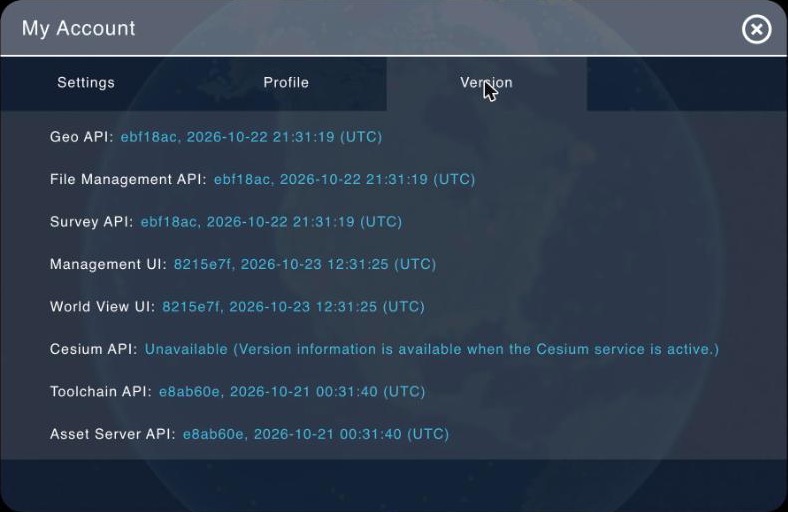
The same services in My Account > Version, with each one's code and build date.
For example:
curl -s https://ao.example.com/api/v1/serverstates/geo/heartbeatanswers:
{
  "apiVersion": "1.12.0",
  "applicationStatus": "ok",
  "builtDateTime": "2026-10-21T16:32:58+00:00",
  "builtEpoch": "1792600378",
  "dbConnectivity": "ok",
  "gitCommit": "49312e5624a9ca3536cdf0074212b2fc432fd5f6",
  "status": "alive"
}
What to alert on
- Check the answer, not just the status code.
geo,surveyandfileanswer 200 even when AO's database is down:dbConnectivitythen sayserror. In Uptime Kuma, use the monitor type HTTP(s) - Json Query with the expressiondbConnectivityand the expected valueok. - Watch the database through
geo,surveyorfile.messagealways reportsdbConnectivityasok. - Check
toolchainandcesiumless often, such as every 5 minutes. Each check asks the worker for an answer and can take up to 5 seconds. - Don't alert on
cesiumalone. The Cesium service doesn't always run. When it isn't running, its check answers 504 and the Version tab shows Unavailable (Version information is available when the Cesium service is active.) Look into it if visualizations also stop finishing. asset-serverchecks its storage about once a minute, so its answer can be up to a minute old.- Poll the other checks every 1 to 5 minutes, with a timeout of about 15 seconds.
A check from a script
This Python script (download check_ao.py) checks every service except cesium and exits with 1 if any check fails, so cron, Nagios or a CI job can run it. It needs only Python 3, with no extra packages, and works without internet access on your own network. It names itself in the User-Agent header, because some proxies, such as Cloudflare, refuse Python's default.
#!/usr/bin/env python3
"""Check AO's health checks. Usage: python3 check_ao.py https://ao.example.com"""
import json
import sys
import urllib.error
import urllib.request

ao = sys.argv[1].rstrip("/")
failed = []
for service in ["geo", "survey", "file", "asset-server", "toolchain", "message"]:
    url = f"{ao}/api/v1/serverstates/{service}/heartbeat"
    request = urllib.request.Request(url, headers={"User-Agent": "ao-health-check"})
    try:
        with urllib.request.urlopen(request, timeout=15) as response:
            answer = json.load(response)
        database, built = answer.get("dbConnectivity"), answer.get("builtDateTime")
        healthy = database in (None, "ok")
        print(f"{service:13} {response.status}  database {database}  built {built}")
    except urllib.error.HTTPError as error:
        healthy = False
        print(f"{service:13} {error.code}")
    except (urllib.error.URLError, TimeoutError) as error:
        healthy = False
        print(f"{service:13} no answer ({error})")
    except ValueError:
        healthy = False
        print(f"{service:13} the answer isn't a health check (a sign-in page or proxy in the way?)")
    if not healthy:
        failed.append(service)

if failed:
    print("Failed:", ", ".join(failed))
    sys.exit(1)
Activity and usage
These calls need an AO sign-in: see Getting started with the AO API. Use your organization's uuid from GET /api/v1/users/me, under items.organization_details.
| To see | Call | Who can read it | It gives |
|---|---|---|---|
| Sign-ins and sign-outs | GET /api/v1/oauth2/organizations/{org_uuid}/audit |
Admins of that organization | Newest first: when, what happened (action), who (user_name) and a description, including changes to single sign-on settings. Filter with since (a date), user_uuid, entity and action; page with limit (50 by default) and offset |
| People and their last sign-in | GET /api/v1/user-management/organizations/{org_uuid}/users |
Admins and Professionals of that organization | Each person's email, name, role, status and last_login |
| A person's sessions | GET /api/v1/users/{user_uuid}/sessions |
Admins of the person's organization, and the person | Their active sessions: how they signed in (provider), IP address, browser, and when each started and was last used. Add is_active=false for ended ones |
| Storage by project | GET /api/v1/surveys/organization/{org_uuid}/stats |
Admins and Professionals of that organization | For each project: the number and size of its files and of its visualizations, its number of objects, and when its details last changed |
| Remote Sync transfers | GET /api/v1/data-transfer/organizations/{org_uuid}/status |
Admins; Professionals see the transfers they started | The newest 100 sent and 100 received (transfers), each with its status (QUEUED, IN_PROGRESS, PARTIAL_COMPLETED, COMPLETED, FAILED or CANCELED) and progress |
Good to know
- Health checks need no account, so a monitor that only checks health never stores an AO password.
- For the calls that need a sign-in, sign in once and renew with the refresh token, rather than signing in on every poll. Each sign-in starts a new session, an account keeps at most 10, and the oldest is signed out. On MCP-enabled AO, a Read only API token is simpler: it isn't a session and can't change anything. See Ways to sign in in Getting started with the AO API.
- Poll storage by project at most every hour or so. It adds up every file, visualization and object, which takes a while on a large AO. It answers 404 when the organization has no projects.
- The sign-in record has a
logoutrow for every session, timed at the session's last activity, even when nobody signed out. - AO's checks don't cover the server itself. On self-hosted AO and AO OnBoard, also watch disk space and the server with your usual tools. Everything on this page works on your own network without internet access.
- AO in the cloud and AO for government: Terradepth watches these. Their status page is status.ao.terradepth.com.
Related: Getting started with the AO API · Upload and download files with a script · Troubleshooting and getting help