
AO has a REST API: the web app and the AO CLI use it, and your own scripts and systems can too. This article covers where to find the API reference, the ways to sign in, and what to know before you start.
The API reference
Every AO has its API reference at https://<your AO address>/api/v1/docs/, such as https://ao.terradepth.com/api/v1/docs/. Include the / at the end. It lists every call with its parameters and responses. Choose an API under Select a definition, at the top right:
| API | What it covers |
|---|---|
| AO User Management API | Signing in, your account, users, organizations and groups |
| AO Project Management API | Projects, their files, visualizations, objects and external layers |
| AO File Management API | Uploading and downloading files, and cloud mounts |
| TD Asset Server API | Map assets that AO serves, and coordinate reference system (CRS) lookups |
| AO Message API | Messages from data sources, such as vessel positions (Beta) |
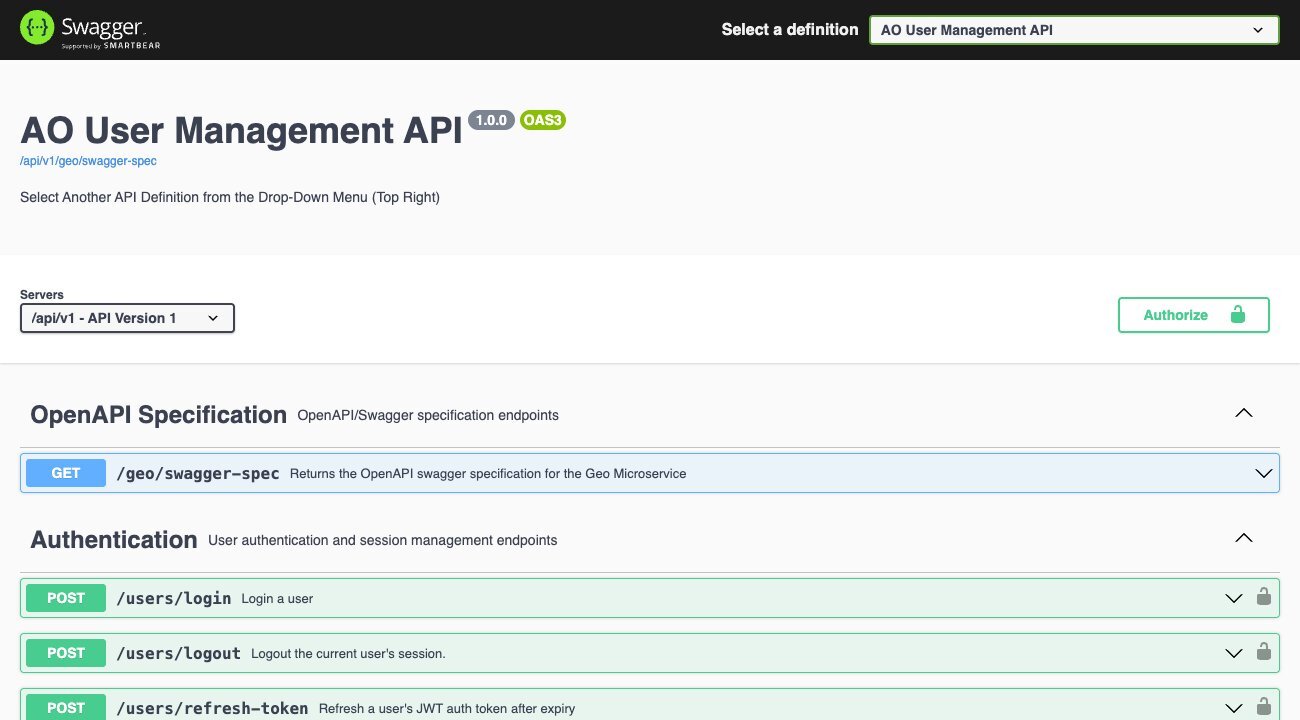
Self-hosted AO and AO OnBoard have the same API and reference at your server's address, and they work without the internet.
Ways to sign in
| Way | Works on | Best for | How long it lasts |
|---|---|---|---|
| Email and password | Every AO | Scripts on any AO | A 3-hour token that you renew; each sign-in is one of your sessions |
| API token | MCP-enabled AO (preview) | Scripts, monitors, and AI assistants on your computer | 7 to 365 days, as you choose; not a session |
| Sign in with AO (OAuth) | MCP-enabled AO (preview) that uses HTTPS | Apps that act for you, such as claude.ai and ChatGPT, and apps you build | As long as it's used at least once a year |
Each way gives the same access as your account. To tell whether your AO is MCP-enabled, open My Account: an MCP-enabled AO has an API tokens tab.
Sign in with a password
- Send
POST /api/v1/users/loginwith your AO email and password in theX-EmailandX-Passwordheaders. - The response's
user-contextheader is a JSON object holding anauth_tokenand arefresh_token. - Send the
auth_tokenwith every other call, in anAuthorization: Bearer <auth_token>header.
For example, with your password in the AO_PASSWORD environment variable rather than in the command:
curl -s -D - -o /dev/null -X POST "https://ao.terradepth.com/api/v1/users/login" \
  -H "X-Email: you@example.com" -H "X-Password: $AO_PASSWORD"
Then, with the auth_token in AO_TOKEN, a first call returns your name, email and organizations:
curl -s "https://ao.terradepth.com/api/v1/users/me" -H "Authorization: Bearer $AO_TOKEN"The auth_token lasts 3 hours. To get a new one, send the refresh_token in the X-Refresh-Token header to POST /api/v1/users/refresh-token. Its user-context header holds a new auth_token and a new refresh_token: keep the new refresh token for next time. POST /api/v1/users/logout ends the session.
API tokens
Applies to:
MCP-enabled AO (preview)
An API token stands in for your sign-in, with no password and no renewing.
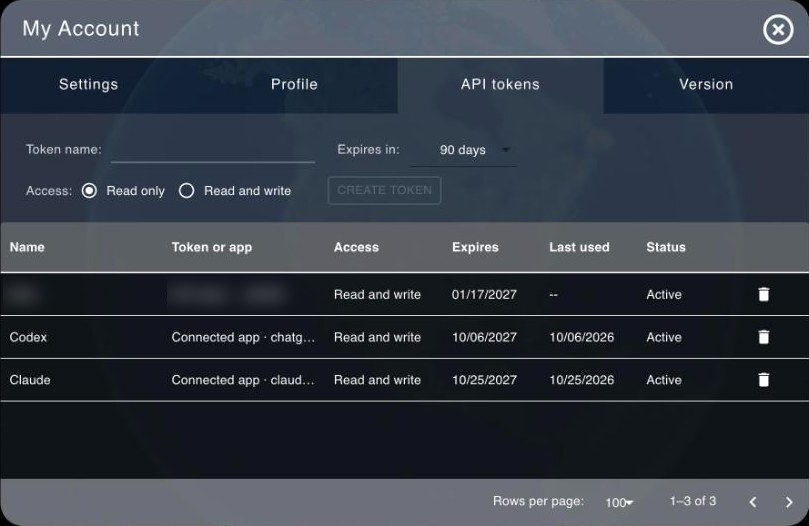
- In AO, open My Account > API tokens and choose Create token.
- Enter a Token name, choose when it Expires in (7, 30, 90, 180 or 365 days; 90 by default) and its Access: Read only (the default) or Read and write.
- Copy the token: AO shows it only once.
Send it like a signed-in token, in an Authorization: Bearer <token> header, on any call. Keep it in an environment variable rather than in your script:
curl -s "https://ao.example.com/api/v1/users/me" -H "Authorization: Bearer $AO_TOKEN"- A Read only token can't change anything: AO answers 403 "This API token is read-only."
- Some things need a password sign-in: creating or revoking tokens, setting passwords, signing out, single sign-on settings and switching organization. AO answers 403 "API tokens can't be used for this operation. Sign in to AO to do it."
- The TD Asset Server API doesn't take API tokens. Sign in with a password for its calls that need a sign-in.
- Revoke a token with the
 bin icon (Revoke) on its row in My Account > API tokens, where Last used shows roughly when each was last used. Setting a new password revokes all your tokens.
Sign in with AO (OAuth)
Applies to:
MCP-enabled AO (preview)
An app can ask to act for you, the way apps ask to use a Google or Microsoft account. You sign in to AO in your browser, with your password or your organization's single sign-on, and AO shows Connect an app to your AO account, with the app, where it sends you back to, and the account you're signed in as. If the app asks to make changes, you choose Read only or Read and change. Then choose Approve. AI assistants such as claude.ai and ChatGPT connect this way: see Connect an AI assistant to AO.
To build your own app on it:
- AO describes its sign-in at
https://<your AO address>/.well-known/oauth-authorization-server. - Register your app with
POST /api/v1/oauth/register, then use the authorization code flow with PKCE (S256, required) at/api/v1/oauth/authorizeand/api/v1/oauth/token. - The scopes are
readandwrite. An app that asks for none getsread. - Send people back to an
https://address, or, for a program on their computer, tohttp://localhostorhttp://127.0.0.1on any port. - Access tokens last 3 hours. Refresh tokens last a year and are replaced each time you use one.
- AO must use HTTPS for this.
Connected apps are listed in My Account > API tokens, each with a bin icon (Revoke).
Good to know
- The API can do what your account can do in AO. Your role and organizations decide what you see and change, and a call your account isn't allowed to make gets 403.
- Single sign-on needs a browser. A script can't sign in through your identity provider. On MCP-enabled AO, create an API token in the browser, or have your app sign in with AO.
- With a password, sign in once, then renew with the refresh token. Each sign-in starts a new session, and an account keeps at most 10, so a script that signs in on every run can sign you out of your browsers. Repeated failed sign-ins lock the account for a while. An API token avoids both.
- Keep tokens as safe as passwords: anyone who has one can act as you.
- Try it out on the reference page sends a real request to your AO, so changes it makes are real.
- Examples: Upload and download files with a script and Monitoring AO through the API. The AO CLI handles large transfers for you.
Related: Upload and download files with a script · Run your own analysis on AO data · Monitoring AO through the API · Connect an AI assistant to AO · Moving files in and out of AO · Security in AO